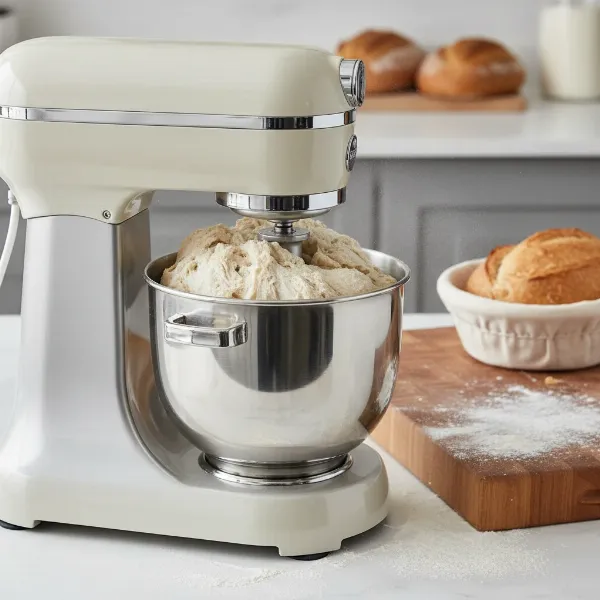
There’s nothing quite like the rhythm of a stand mixer at work, effortlessly blending, whipping, or kneading your ingredients. But when that familiar hum gives way to a strained groan, a hot touch, or even a burning smell, it can bring your culinary ambitions to a grinding halt. As someone with over a decade of hands-on experience with stand mixers, from vintage models to the latest innovations, I understand the frustration and concern when your trusty kitchen companion starts to overheat. This guide will delve into the common reasons behind stand mixer overheating, offer immediate troubleshooting steps, and provide expert tips to ensure your machine runs smoothly for years to come.
Understanding Stand Mixer Overheating: What’s Happening Inside?
At its core, a stand mixer’s motor is designed to work hard, generating heat as it operates. This is a normal part of its function. Most modern stand mixers, especially robust models, incorporate an internal thermal overload protection switch. This crucial safety feature is designed to automatically shut off the mixer if the motor temperature reaches a critical level, preventing permanent damage. While a slightly warm mixer head after extended use is often normal, a machine that’s excessively hot to the touch, producing a burning smell, or shutting down indicates a deeper issue that needs attention. It’s a sign that the motor is working harder than it should be, and the heat generated is exceeding its ability to dissipate safely.
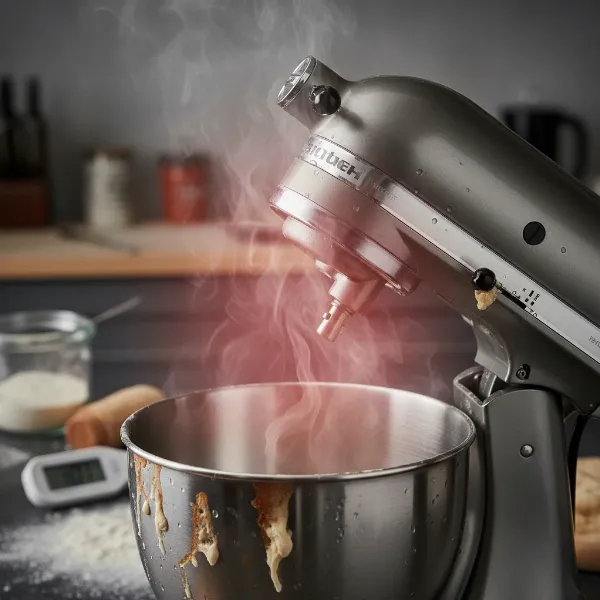 A stand mixer head that is excessively hot, with visible heat waves, indicating overheating.
Common Causes of Stand Mixer Overheating
Understanding why your stand mixer overheats is the first step toward a lasting solution. Several factors, often interconnected, can contribute to this problem.
Overloading the Mixer
|
Our Picks for the Best Stand mixer in 2026
As an Amazon Associate I earn from qualifying purchases.
|
||
| Num | Product | Action |
|---|---|---|
| 1 | Cuisinart SMD-50CRM Precision Pro 5.5-Quart Digital Stand Mixer with 12-Speeds, 3 Preprogrammed Food Prep Settings, Mixing Bowl, Chef's Whisk, Flat Mixing Paddle, Dough Hook, and Splash Guard, Cream |

|
| 2 | Kitchen in the box Stand Mixer,3.2Qt Small Electric Food Mixer,6 Speeds Portable Lightweight Kitchen Mixer for Daily Use with Egg Whisk,Dough Hook,Flat Beater (Black) |
|
| 3 | Cuisinart SM-50G Precision Master 5.5-Quart 12-Speed Stand Mixer with Mixing Bowl, Chef's Whisk, Flat Mixing Paddle, Dough Hook, and Splash Guard with Pour Spout, Agave Green, Manual |
|
| 4 | Kitchen in the box Stand Mixer,3.2Qt Mini Electric Food Mixer,6 Speeds Portable Lightweight Kitchen Mixer for Daily Use with Egg Whisk,Dough Hook,Flat Beater (Green) |
|
| 5 | 3-IN-1 Electric Stand Mixer, 6.5QT Bowl 660W 10-Speed Kitchen Mixer, Household Food Mixers include Dough Hook, Beater and Whisk, Bread Cake Mixer for Baking and Most Home Cooks, Red |
|
| 6 | Kitchen in the box Stand Mixer,3.2Qt Small Electric Food Mixer,6 Speeds Portable Lightweight Kitchen Mixer for Daily Use with Egg Whisk,Dough Hook,Flat Beater (Blue) |
|
| 7 | Cuisinart SPI-50 Spiralizer, White |
|
| 8 | Cuisinart SMD-50BC Precision Pro 5.5-Quart Digital Stand Mixer With 12-Speeds, 3 Preprogrammed Food Prep Settings, Mixing Bowl, Whisk, Flat Mixing Paddle, Dough Hook, And Splash Guard, Silver Lining |
|
| 9 | Cuisinart SMD-50GPH Precision Pro 5.5-Quart Digital Stand Mixer with 12-Speeds, 3 Preprogrammed Food Prep Settings, Mixing Bowl, Whisk, Flat Mixing Paddle, Dough Hook, and Splash Guard, Graphite |
|
| 10 | Cuisinart Stand Mixer, 12 Speeds, 5.5-Quart Mixing Bowl, Chef's Whisk, Flat Mixing Paddle, Dough Hook, and Splash Guard with Pour Spout, Silver Lining, SM-50BC, Silver Lining |
|
One of the most frequent culprits is simply asking too much of your mixer. Every stand mixer has a recommended capacity limit, whether for flour, dough, or total mixture weight. Exceeding this limit, especially with dense ingredients like bread dough or thick cookie batters, forces the motor to work beyond its rated capacity. This excessive strain generates significant heat as the motor struggles to maintain operation. Always check your user manual for your model’s maximum capacity and consider dividing large recipes into smaller batches to prevent overloading.
Incorrect Speed Settings
Using the wrong speed for a particular task can also put undue stress on the motor. For instance, many manufacturers, including KitchenAid, specifically recommend using speed 2 for kneading yeast doughs. Using a higher speed for such heavy mixtures can overwork the motor, creating unnecessary strain and heat. Conversely, using too low a speed for a thick batter might not provide enough momentum, causing the motor to labor more. Always refer to your mixer’s manual for recommended speed settings for different types of ingredients and attachments.
Prolonged Use Without Breaks
Even within capacity limits and at correct speeds, continuous operation for extended periods can lead to overheating. Just like any hardworking appliance, a stand mixer’s motor needs occasional breaks to cool down. Running it back-to-back for multiple heavy batches without a pause can cause heat to accumulate, eventually tripping the thermal overload switch. Allowing your mixer a 5-10 minute rest period between heavy tasks can make a significant difference in its performance and longevity.
Poor Airflow and Ventilation
Stand mixers are designed with built-in air vents to help cool the motor during operation. If these vents become blocked by dust, flour, grease, or are obstructed by placement too close to a wall or cabinet, proper airflow is compromised. Dust and debris can also accumulate inside the motor housing itself, trapping heat and preventing efficient cooling. This poor ventilation forces the motor to run hotter than intended.
Worn or Damaged Internal Components
Over time, certain internal parts of your stand mixer can wear down, increasing friction and causing the motor to work harder.
- Motor Brushes: These small carbon pieces conduct electricity to the motor’s armature. As they wear down, the motor operates less efficiently, generates more heat, and may even spark or emit a burning smell.
- Dried-out Grease/Worn Gears: The gearbox contains grease that ensures smooth operation of the gears. If this grease dries out or becomes dirty, or if the gears themselves wear down, the increased friction can lead to significant heat generation.
- Bearings: Worn bearings can also contribute to increased friction and motor strain.
Electrical Issues and Environmental Factors
Less common, but potentially serious, are internal electrical problems such as faulty wiring or a failing motor, which can create excessive heat from electrical resistance. Loose connections or old wires can lead to arcing. Additionally, external factors can play a role: a hot kitchen environment can contribute to overheating. Sometimes, even rising steam from hot ingredients being mixed can condense on the mixer’s circuit board, temporarily interrupting the electrical flow and causing a shutdown.
Immediate Steps When Your Stand Mixer Overheats
If your stand mixer suddenly stops, feels unusually hot, or emits a burning smell, here’s what to do immediately:
- Stop Operation and Unplug: Immediately turn the speed control to “0” (OFF) and unplug the mixer from the power outlet. This is crucial for safety and to prevent further damage.
- Remove Contents: Carefully remove the mixing bowl and any attachments. If there’s dense dough or batter causing strain, clear it out.
- Allow to Cool Down: Let the mixer rest. For minor overheating, this might take 30 minutes. For more significant issues where the mixer is too hot to comfortably touch, it could take 45 minutes or longer for the internal motor and external components to cool completely. Do not attempt to use it again until it is entirely cool.
- Initial Inspection: While it’s cooling, check for any obvious blockages around the air vents. Ensure the mixer is placed on a flat, open surface for optimal ventilation.
Advanced Troubleshooting and Maintenance for Overheating
Once your mixer has cooled, you can investigate further or perform maintenance.
Inspecting and Replacing Motor Brushes
If your mixer is older or heavily used, worn motor brushes are a prime suspect. Many stand mixers allow for user-replacement of brushes. Unplug the mixer, locate the brush caps on either side of the motor housing (often coin-slotted), and remove them. Pull out the brushes and inspect their length. If they are less than 1/4 inch long, they should be replaced. This is a relatively straightforward DIY repair for many models, but always consult your user manual for specific instructions or consider professional assistance if unsure.
Cleaning the Motor Housing and Vents
Dust, flour, and grease can build up not only on the exterior but also within the motor housing over time. With the mixer unplugged and cooled, use a soft brush or a vacuum cleaner with a narrow attachment to gently clear debris from all external vents. For internal cleaning, this often requires disassembling part of the mixer’s head, which can be more complex. If you’re not comfortable doing this, a professional can perform a deep cleaning.
Regreasing the Gearbox
The grease within the gearbox can dry out or become ineffective after several years of use (typically 3-5 years for heavy users). Dried grease increases friction, forcing the motor to work harder and generate heat. Regreasing involves opening the mixer’s head, cleaning out old grease, and applying fresh, food-grade grease. This is a more involved maintenance task and often best left to a qualified technician unless you are very comfortable with appliance repair.
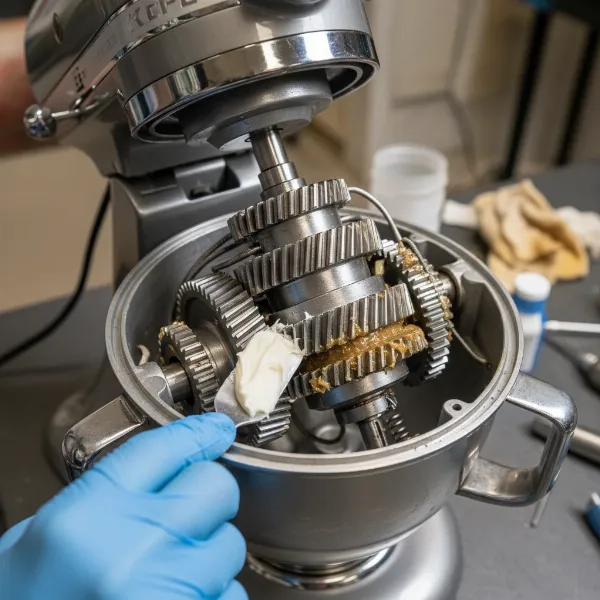 Close-up of a stand mixer's gearbox being regreased, showing internal gears and fresh food-grade grease.
When to Call a Professional
While many overheating issues can be resolved with simple troubleshooting and maintenance, some problems warrant professional attention. If you suspect faulty wiring, a failing motor, or issues with the circuit board, or if your mixer continues to overheat despite performing all the above steps, it’s time to seek expert help. Persistent burning smells or smoke are also clear indicators that professional diagnosis and repair are necessary to prevent further damage or safety hazards.
Preventative Measures to Avoid Future Overheating
Prevention is always better than cure. By adopting a few mindful practices, you can significantly extend the life of your stand mixer and prevent future overheating incidents.
Respect Capacity Limits
Always consult your stand mixer’s user manual for its specific capacity recommendations. When baking large batches or working with dense doughs like artisanal bread, divide your ingredients and mix them in smaller portions. It’s better to mix two smaller batches than to strain your motor with one oversized load.
Use Recommended Speeds
Pay close attention to the recommended speed settings for different tasks and attachments. For heavy doughs, stick to low speeds (typically speed 2 for yeast dough). Avoid cranking up the speed in an attempt to power through thick mixtures; this only puts more strain on the motor.
Implement Rest Periods
If you’re embarking on a baking marathon or tackling multiple heavy-duty tasks, give your stand mixer a break. Allow it to rest for 5-10 minutes between batches, especially when dealing with dense doughs or continuous mixing that heats up the motor. This allows accumulated heat to dissipate naturally.
Ensure Proper Ventilation
Always place your stand mixer on a stable, flat, and open surface. Avoid positioning it directly against a wall or under cabinets that could obstruct its air vents. Make sure the vents are clear of any debris before and during operation. Good airflow is essential for efficient cooling.
Regular Cleaning and Maintenance Schedule
Establish a routine for cleaning your stand mixer. Wipe down the exterior after each use to prevent flour, sugar, and grease buildup. Periodically clean the air vents with a small brush or vacuum. Every few years, consider having the motor brushes inspected and replaced, and the gearbox regreased by a technician, especially if you use your mixer frequently.
Expert Tips for Stand Mixer Longevity
“Your stand mixer is a kitchen workhorse, but it’s not invincible. Listen to its sounds, pay attention to its temperature, and treat it with regular care. A little preventative maintenance goes a long way in ensuring it remains a trusted part of your kitchen for decades.” – Admin, Standmixerpro.com
Think of your stand mixer as a finely tuned machine. It performs best when used within its design parameters. Avoid forcing it, pushing it to its limits without a break, or neglecting basic cleaning. By doing so, you’re not just preventing overheating; you’re investing in its long-term performance and reliability.
Conclusion
An overheating stand mixer can be a worrying experience, but it’s often a sign that your loyal kitchen appliance needs a little attention. By understanding the common causes—from overloading and incorrect speeds to poor ventilation and worn components—and by implementing simple troubleshooting and preventative measures, you can bring your mixer back to its optimal working condition. Regular maintenance and mindful use are key to preventing future issues and ensuring your stand mixer continues to be an invaluable tool in your culinary adventures. What’s one stand mixer maintenance tip you swear by that you think every baker should know?
Frequently Asked Questions
How long should a stand mixer cool down after overheating?
If your stand mixer overheats and shuts off, it’s recommended to turn it off, unplug it, and allow it to cool completely for at least 30 to 45 minutes. This ensures the internal motor and external components return to a safe operating temperature before resuming use, preventing further damage.
Can I use my stand mixer for kneading bread at high speed?
No, it is strongly advised against using high speeds for kneading dense mixtures like bread dough. Most manufacturers, including KitchenAid, recommend using speed 2 for yeast doughs. Higher speeds can put excessive strain on the motor, leading to overheating and potential damage.
How often should I clean the internal parts of my stand mixer?
While the exterior should be wiped after every use, internal parts like motor brushes and gearbox grease typically require inspection or maintenance every 3 to 5 years, or more frequently with heavy use. Cleaning internal motor housing vents can be done more regularly by a careful user or professional during these periodic checks.
Is it normal for a stand mixer to get warm?
A Stand Mixer may feel slightly warm to the touch after prolonged use, especially with heavy mixtures. This is often normal as the motor generates heat during operation. However, if it feels excessively hot, emits a burning smell, or shuts down, it indicates an issue beyond normal warmth and requires troubleshooting.