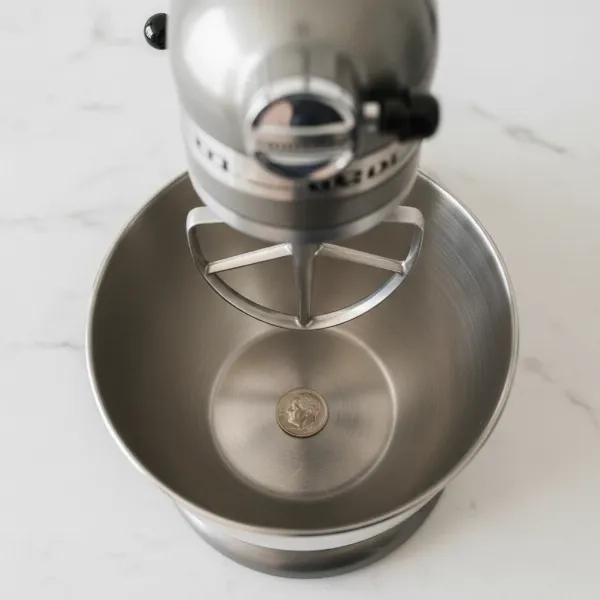
There’s little more frustrating in the kitchen than firing up your trusty stand mixer, only to watch it slowly, yet determinedly, “walk” its way across the countertop. This unsettling dance isn’t just annoying; it can be dangerous, potentially leading to spills, damage, or even injury if your mixer takes an unexpected tumble. If you’ve ever found yourself babysitting your appliance during a heavy-duty dough knead, constantly nudging it back into place, you’re not alone. This common issue plagues bakers and home cooks alike, but the good news is that most cases of a wandering stand mixer have straightforward explanations and even simpler solutions.
Understanding why your powerful kitchen companion develops a mind of its own is the first step to taming it. Typically, the “walking” phenomenon is a direct result of vibration and the considerable force generated by the motor and attachments, especially when tackling thick batters or stiff doughs. While stand mixers are built for power, certain conditions can amplify these forces, transforming a gentle hum into a countertop migration. Let’s delve into the specific culprits behind this common kitchen conundrum and, more importantly, equip you with the knowledge to put an end to the unwanted counter shuffle for good.
Understanding Why Your Stand Mixer Moves
Stand mixers are powerful tools, designed to handle everything from delicate meringues to dense bread dough. This versatility comes from a robust motor and gearing system that transmits significant force to the mixing attachments. When working correctly, this force is contained and controlled, allowing your mixer to stand firm. However, various factors can disrupt this balance, leading to excessive vibration that manifests as “walking.”
The core reason for a stand mixer moving is an imbalance of forces. As the dough hook or beater churns through ingredients, it creates resistance and torque. If this resistance is unevenly distributed or if there’s an issue with the mixer’s stability or internal components, the vibrations can intensify, causing the appliance to slowly but surely travel across your countertop. While some slight movement is normal during extremely heavy mixing tasks, a mixer that consistently travels across the counter is signaling a problem that needs attention.
Common Causes of Stand Mixer “Walking”
Identifying the root cause of your mixer’s wanderlust is crucial for finding the right fix. Several factors, ranging from user error to maintenance needs, can contribute to this problem.
Unbalanced Load or Overloading
|
Our Picks for the Best Stand mixer in 2026
As an Amazon Associate I earn from qualifying purchases.
|
||
| Num | Product | Action |
|---|---|---|
| 1 | 3-IN-1 Electric Stand Mixer, 6.5QT Bowl 660W 10-Speed Kitchen Mixer, Household Food Mixers include Dough Hook, Beater and Whisk, Bread Cake Mixer for Baking and Most Home Cooks, Red |

|
| 2 | Cuisinart SMD-50GPH Precision Pro 5.5-Quart Digital Stand Mixer with 12-Speeds, 3 Preprogrammed Food Prep Settings, Mixing Bowl, Whisk, Flat Mixing Paddle, Dough Hook, and Splash Guard, Graphite |
|
| 3 | Cuisinart SMD-50BC Precision Pro 5.5-Quart Digital Stand Mixer With 12-Speeds, 3 Preprogrammed Food Prep Settings, Mixing Bowl, Whisk, Flat Mixing Paddle, Dough Hook, And Splash Guard, Silver Lining |
|
| 4 | Cuisinart SM-50G Precision Master 5.5-Quart 12-Speed Stand Mixer with Mixing Bowl, Chef's Whisk, Flat Mixing Paddle, Dough Hook, and Splash Guard with Pour Spout, Agave Green, Manual |
|
| 5 | Cuisinart SMD-50CRM Precision Pro 5.5-Quart Digital Stand Mixer with 12-Speeds, 3 Preprogrammed Food Prep Settings, Mixing Bowl, Chef's Whisk, Flat Mixing Paddle, Dough Hook, and Splash Guard, Cream |
|
| 6 | Cuisinart SPI-50 Spiralizer, White |
|
| 7 | Kitchen in the box Stand Mixer,3.2Qt Small Electric Food Mixer,6 Speeds Portable Lightweight Kitchen Mixer for Daily Use with Egg Whisk,Dough Hook,Flat Beater (Blue) |
|
| 8 | Kitchen in the box Stand Mixer,3.2Qt Small Electric Food Mixer,6 Speeds Portable Lightweight Kitchen Mixer for Daily Use with Egg Whisk,Dough Hook,Flat Beater (Black) |
|
| 9 | Cuisinart Stand Mixer, 12 Speeds, 5.5-Quart Mixing Bowl, Chef's Whisk, Flat Mixing Paddle, Dough Hook, and Splash Guard with Pour Spout, Silver Lining, SM-50BC, Silver Lining |
|
| 10 | Kitchen in the box Stand Mixer,3.2Qt Mini Electric Food Mixer,6 Speeds Portable Lightweight Kitchen Mixer for Daily Use with Egg Whisk,Dough Hook,Flat Beater (Green) |
|
One of the most frequent reasons a stand mixer begins to “walk” is an unbalanced load within the mixing bowl. When kneading dough, especially high-hydration or sticky varieties, the dough can sometimes clump up on one side of the dough hook or bowl. This creates an uneven distribution of weight and resistance, causing the mixer to rock and vibrate more intensely as it tries to compensate. Similarly, overloading your stand mixer by exceeding its stated capacity with too much heavy dough or thick batter can strain the motor and transmission, leading to excessive movement. Every stand mixer has a limit to how much it can comfortably handle; pushing beyond that can cause instability.
Worn or Damaged Rubber Feet
The rubber feet on the base of your stand mixer are its primary defense against slipping. These feet are designed to grip the countertop, creating friction that keeps the appliance stationary during operation. Over time, these rubber feet can wear down, harden, crack, or even fall off. When they lose their integrity or are missing, the mixer no longer has adequate grip, allowing it to slide and vibrate freely across even slightly slippery surfaces. Misaligned feet, where one or more rubber pads are not making full contact with the counter, can also create an unstable base, contributing to the problem.
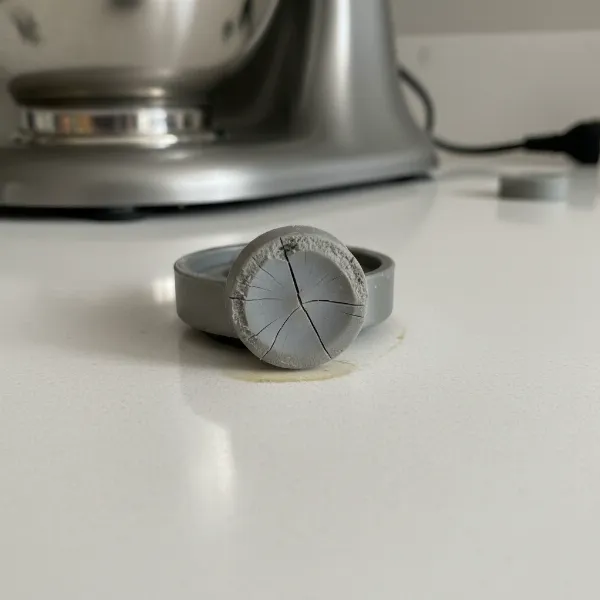 Close-up of a stand mixer's base with worn, cracked rubber feet failing to grip the countertop.
Unstable or Slippery Countertop Surface
Even a perfectly functioning stand mixer with intact feet can struggle to stay put on certain surfaces. Smooth, polished countertops like granite, marble, or stainless steel can be quite slippery, offering little friction for the mixer’s feet to grip. An uneven countertop can also be a culprit, as it prevents all the mixer’s feet from bearing weight equally, creating an unstable foundation that encourages movement and vibration. A wobbly island or a countertop seam directly under the mixer can exacerbate these issues.
Incorrect Beater-to-Bowl Clearance
The distance between the attachment (beater, whisk, or dough hook) and the bottom or sides of the mixing bowl, known as beater-to-bowl clearance, is critical for efficient mixing and stable operation. If the attachment is set too low, it can scrape the bottom of the bowl, causing unnecessary resistance and jarring movements. Conversely, if it’s too high, it won’t properly incorporate ingredients at the bottom, leading to unbalanced mixing and potential strain on the mixer as it tries to work harder. In some tilt-head models, incorrect clearance can also contribute to excessive head wobble.
Loose Internal Components (Tilt-Head Specific)
Tilt-head stand mixers, popular for their ease of use, can sometimes develop “walking” issues due to loose internal components, particularly in the head mechanism. Over years of use, especially with heavy doughs, the main head screw or hinge pin that secures the tilt-head in place can loosen. This results in an increased wobble or “play” in the head during operation, which can then translate into the entire mixer moving across the counter. A loose attachment hub, though less common, can also contribute to unusual vibrations, although it primarily impacts attachment stability rather than full mixer movement.
Effective Solutions to Stop Your Stand Mixer from Moving
Fortunately, addressing a “walking” stand mixer often involves simple adjustments and maintenance. Here’s how to tackle the problem effectively:
Ensure a Stable and Level Surface
The easiest and first step is to ensure your stand mixer is on a perfectly flat, stable, and non-slippery surface. Avoid placing it over countertop seams or on wobbly tables. If your countertop is particularly smooth, consider placing a non-slip mat, such as a silicone baking mat or a specialized appliance mat, underneath the mixer. These mats provide excellent grip and absorb vibrations, offering an immediate and often effective solution.
Inspect and Replace Rubber Feet
Regularly check the rubber feet on the underside of your stand mixer. If they appear worn, cracked, missing, or hardened, they are no longer providing adequate grip. Replacement feet are typically inexpensive and readily available from appliance parts retailers or the manufacturer. This simple fix can dramatically improve stability. Ensure all feet are present and making firm, even contact with the counter.
Properly Load and Avoid Overloading
Always adhere to your stand mixer’s recommended capacity limits, especially when working with heavy doughs. When adding ingredients, try to distribute them as evenly as possible in the bowl. If you’re making a particularly stiff dough, start at a lower speed to allow the ingredients to combine gradually and prevent the dough from clumping unevenly around the hook. If the dough starts to climb the hook excessively, pause the mixer, scrape it down, and redistribute it manually.
Adjust Beater-to-Bowl Clearance
For many stand mixers, especially KitchenAid models, adjusting the beater-to-bowl clearance is a straightforward process. If your attachment is scraping the bowl or not reaching the bottom, it’s time to adjust. A common method for tilt-head mixers is the “dime test”:
- Place a dime in the bottom of your empty mixing bowl.
- Attach your flat beater and lower the head.
- Turn the mixer on the lowest speed.
- If the beater moves the dime about an inch with each rotation, the clearance is correct. If it doesn’t move the dime at all, the beater is too high. If it vigorously pushes the dime around, it’s too low.
To adjust, locate the small flathead screw on the neck of your mixer (often where the head meets the base when tilted up). Turn it clockwise to lower the beater or counter-clockwise to raise it, making small adjustments and retesting with the dime until you achieve the ideal clearance.
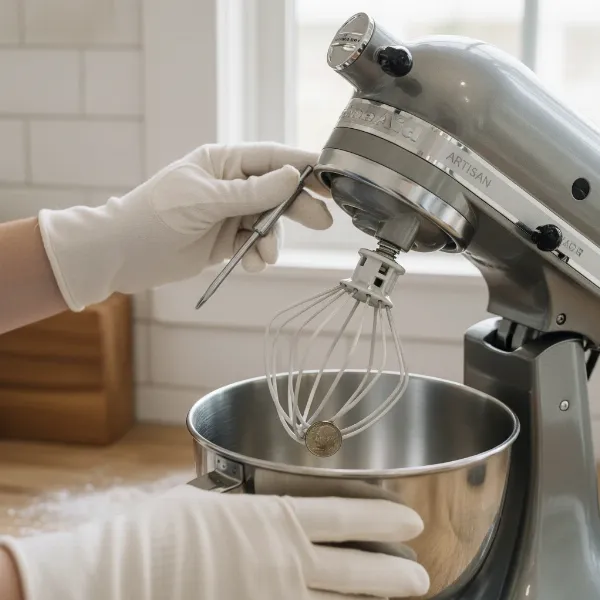 Hands performing the dime test to adjust a stand mixer's beater-to-bowl clearance with a screwdriver.
Tighten Loose Components (Tilt-Head Models)
If your tilt-head stand mixer has a noticeable wobble in the head, particularly during heavy mixing, a loose head screw or hinge pin is likely the culprit.
- Unplug your mixer.
- Tilt the head back and look for a flathead screw located where the head connects to the body or beneath the mixer base.
- Using a long flathead screwdriver, tighten this screw firmly. Be careful not to overtighten, but ensure it’s snug enough to remove the play in the head. This often requires turning the mixer over to access the screw in the base.
For hinge pins that work themselves out, push the pin back in until it’s flush, then locate the corresponding screw (usually underneath the mixer) that secures it and tighten it. Also, periodically check that the attachment hub screw is tight, preventing any wobble where attachments connect.
Reduce Mixer Speed for Heavy Tasks
While it might be tempting to crank up the speed for tough jobs, high speeds generate more vibration. For very heavy doughs or dense batters, use the lowest effective speed setting. This reduces strain on the motor and gears, minimizing vibrations and giving the mixer a better chance to stay put. Most doughs benefit from slow, steady kneading rather than high-speed churning.
When to Seek Professional Help
Most “walking” stand mixer issues can be resolved with the troubleshooting steps above. However, if you’ve tried all the common fixes and your mixer continues to move excessively, or if you notice unusual noises, smells, or a significant loss of power, it might indicate a more serious internal problem. Issues like worn motor brushes, damaged gears, or a failing motor might require professional service or replacement parts. In such cases, consulting an authorized service technician or contacting the manufacturer is advisable to prevent further damage and ensure safe operation.
Buying Guide: Summing Up Stand Mixer Stability
Choosing a stand mixer that stays put is key for an enjoyable baking experience. While the immediate issue of a “walking” mixer is often resolvable, understanding the factors that contribute to stability can help you make informed decisions, whether you’re fixing an old friend or buying a new one.
Ultimately, a stable stand mixer is a joy to use. By addressing potential issues like unbalanced loads, worn feet, or loose components, you can ensure your appliance remains a reliable, stationary workhorse in your kitchen. Don’t let a “walking” mixer deter your baking ambitions; a few simple checks and adjustments are usually all it takes to bring it back in line.
Frequently Asked Questions
Is it normal for my stand mixer to move a little when kneading dough?
A slight wiggle or gentle vibration can be normal, especially when kneading very stiff bread dough or at higher speeds, due to the powerful forces at play. However, if your mixer is consistently moving across the counter or making loud banging noises, it indicates an underlying issue that needs attention.
Can a stand mixer “walking” on the counter cause damage?
Yes, a stand mixer that frequently “walks” can be damaged. The constant movement and vibration put extra strain on internal components, potentially leading to premature wear of gears and the motor. More importantly, it can fall off the counter, causing significant damage to the mixer itself, your countertop, or posing a safety hazard.
Do larger, heavier stand mixers “walk” less than smaller ones?
Generally, larger and heavier Stand Mixers, particularly bowl-lift models designed for professional use, tend to be more stable and less prone to “walking” than smaller, lighter models. Their increased weight and often more robust construction provide a better anchor against the forces of mixing, especially with heavy doughs. However, even these can “walk” if underlying issues like worn feet or an unbalanced load are present.